.png)
Understanding Visitors
In this article, you'll learn what Visitors are in Enjo, how they are created, how the AI Agent treats them, and how they become Contacts.
What is a Visitor
A Visitor is an anonymous external user who interacts with your Enjo AI Agent without providing identifying information. Visitors are tracked by session data only — they are the starting point of the identity lifecycle.
How Visitors are created
A visitor record is created automatically when someone starts a conversation with your AI Agent through the web widget or another anonymous channel without providing an email. No manual creation is needed.
Common scenarios that create visitors:
A user opens the web chat widget on your Help Center or website and asks a question without entering their email
A user interacts through a channel that does not pass identity information
The Visitors tab
Go to Customers from the left navigation and select the Visitors tab.
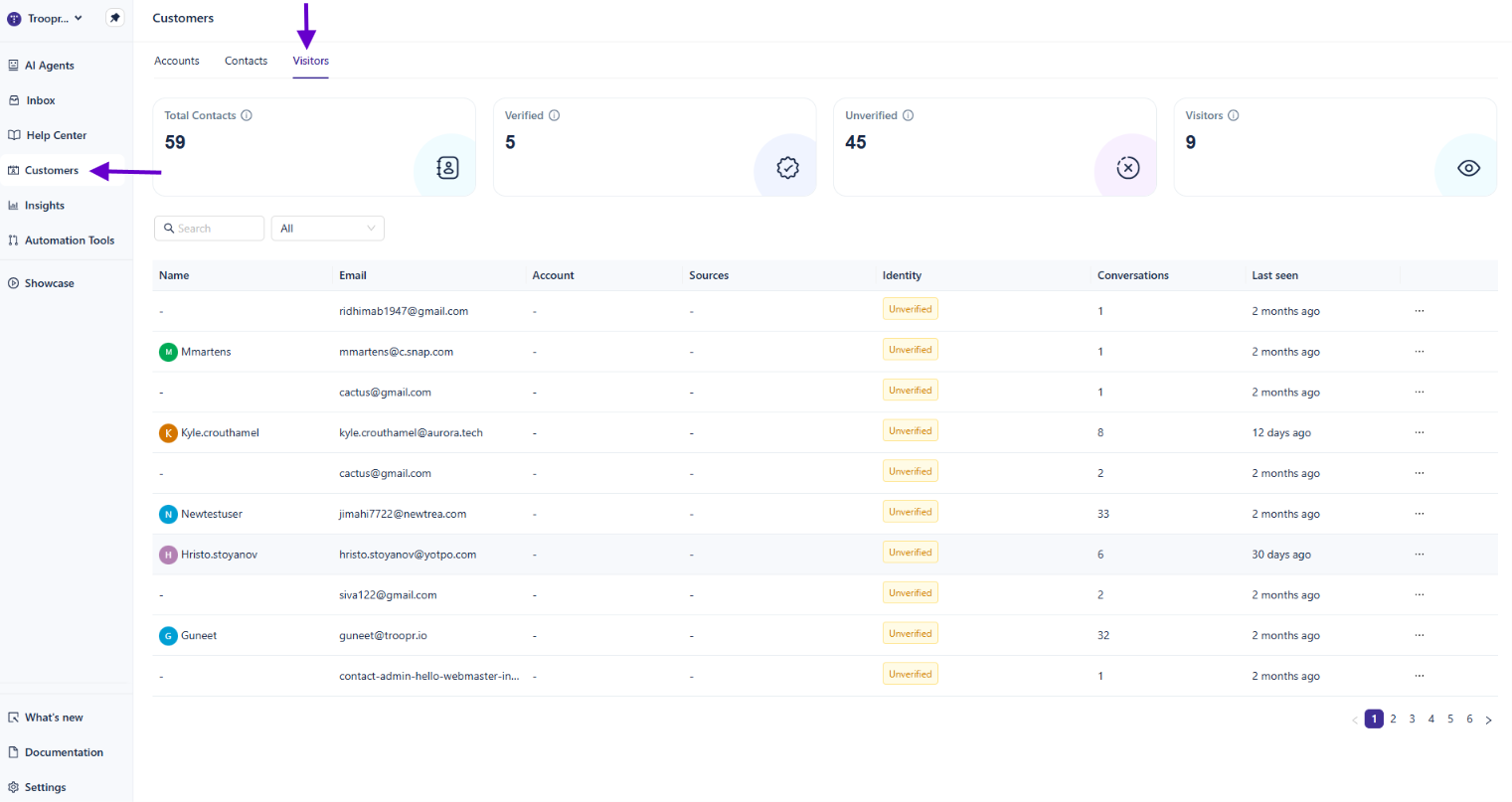
The same four summary cards appear at the top — Total Contacts, Verified, Unverified, and Visitors — giving you workspace-wide context.
The Visitors list shows:
Column | Description |
|---|---|
Name | Auto-generated or anonymous identifier |
Empty for most visitors unless partially captured | |
Account | Typically empty for visitors |
Sources | The channel the visitor came from |
Identity | Shows the identity state — Visitor, Unverified, or Blocked |
Conversations | Number of conversations from this session |
Last seen | When the visitor was last active |
Use the search bar and the filter dropdown to explore visitor records. Filter options include:
All
Visitors
Unverified
Blocked
How the AI Agent treats Visitors
When responding to a visitor, the AI Agent adjusts its behavior to reflect the lower identity confidence:
The AI avoids account-specific assumptions
Sensitive data access is restricted
The AI may prompt the visitor to provide their email when relevant, enabling the upgrade to a contact
How Visitors become Contacts
A visitor is automatically upgraded to a contact when their email is captured. This can happen when:
The visitor provides their email during a conversation — for example, when prompted by the AI Agent or a pre-chat form
The visitor authenticates through another identity mechanism
When this transition happens:
All conversation history from the visitor session is preserved and linked to the new contact record
The visitor entry is removed from the Visitors tab
The new contact appears in the Contacts tab as Unverified
💡TIP: The upgrade to contact is the key event that establishes a durable identity. Visitors are session-scoped and cannot be reliably identified across devices or browser sessions. If the same person returns in a new session without identifying themselves, a new visitor record is created.
Limitations of Visitor records
Because visitors are anonymous:
They cannot be manually edited or enriched with profile data
They cannot be associated with an account
Cross-session tracking is not possible
AI personalization is limited to the current conversation context
What's next
Managing Contacts — Manage contacts once visitors have been upgraded.
Overview of Customers — Understand how Visitors fit into the full identity lifecycle.
Inbox — View conversations initiated by visitors and contacts.