.png)
Setup from Prompt
In this article, you'll learn how AI Actions work, how to configure them for your AI Agent, and how to troubleshoot common issues.
Before you start
You need Owner, Admin, or AI Agent Admin role in Enjo.
At least one AI Agent must be configured in your workspace. See Create AI Agent.
Have a clear idea of the branching logic and instructions you want the AI to perform before starting.
How Prompt Actions work
Prompt Actions are not standalone actions they are designed specifically for use within AI Flows to keep your main flow instructions clean and maintainable.
In an AI Flow, you have one main script where you define the overall conversation logic. When your flow needs to branch into multiple paths, you use Prompt Actions to break that logic into smaller, reusable pieces — each handling its own specific path.
💡 Think of Prompt Actions as sub-scripts that your main flow delegates to when a condition is met. The main flow stays focused on the core conversation while each Prompt Action handles the detail of its specific branch.
Step 1 — Define your main flow instructions
Create your main flow script to define the core conversation and handle data collection logic.
Refer to the AI Flows guide for detailed guidance.
For example, a hardware issue flow might include:
Ask the user which hardware object they are referring to
Ask the user how long they have been facing the issue
Include as many instructions as needed to gather sufficient information before creating a ticket, responding to the user, or taking any other action.
Step 2 — Plan your branching logic
When the main flow needs to direct users into different paths, define conditions in the main script and map them to Prompt Actions.
For example:
Ask: "How long have you been facing this issue?"
If the user says it has been one month → go to action monthly issues
If the user says it has been one day → go to action daily issues
💡 Write the exact Prompt Action name in your main script at this stage. The name you use in the script must match the action name exactly when you create it in Step 3 — even a difference in capitalisation will cause the flow to fail.
Step 3 — Create the Prompt Actions
For each branch defined in your main script, create a corresponding Prompt Action.
Go to AI Agents and select your agent.
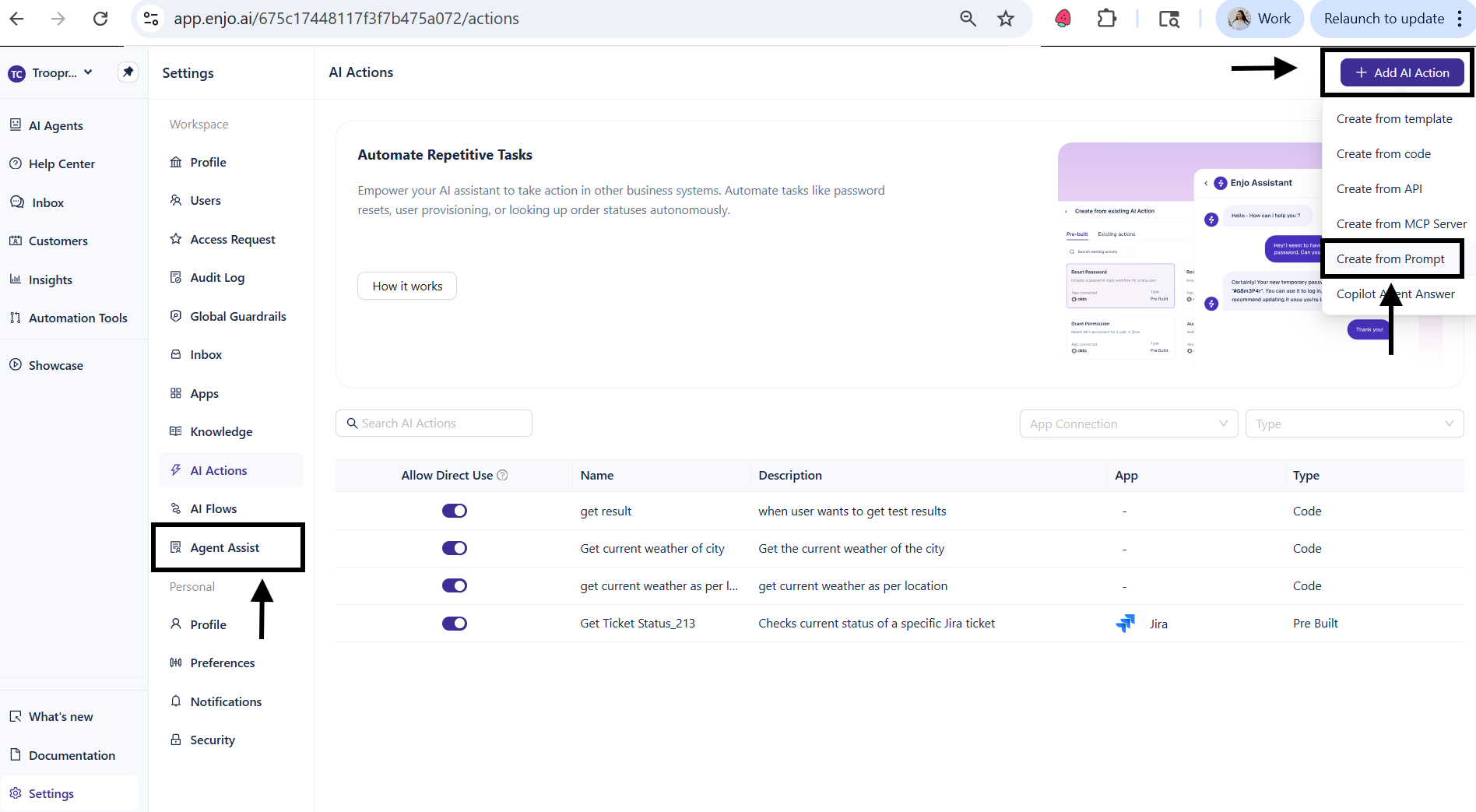
Click the AI Actions tab.
Click + Add AI Action and select Create from Prompt.
Enter the exact action name for example, monthly issues.
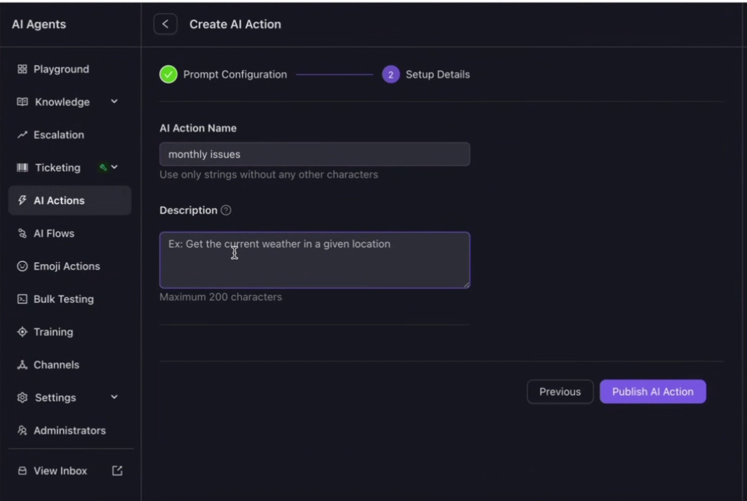
In the system prompt field, write clear and specific instructions for this branch. For example: "Show the user all monthly issues. Ask the user to identify their issue from the list, along with the given fixing date."
Click Publish AI Action.
Repeat for each additional branch for example, creating a daily issues Prompt Action with its own specific instructions.
💡 Always use clear, specific, and direct language in your prompt instructions. Vague or broad instructions lead to unpredictable agent behavior.
Step 4 — Attach Prompt Actions to the flow
Once your Prompt Actions are created, return to your main flow configuration.
Remove redundant instructions : delete any duplicated or overly detailed instructions from the main flow that you have now moved into Prompt Actions.
Reference the actions: confirm the Prompt Actions are added to the flow configuration so that when a condition is met, the flow moves to the corresponding action and executes its logic.
Define return behavior: if you want the flow to return to the main flow after a Prompt Action completes, write that explicitly in the instructions. For example: "Proceed to the next step of the main flow. Give the user a closing greeting. Exit the flow."
Step 5 — Test the flow
Go to Bulk Testing and run test queries that cover each branch.
Verify the agent routes to the correct Prompt Action for each condition.
Confirm the agent responds exactly as intended before deploying to live channels.
💡 Always test all branches before going live including edge cases and ambiguous phrasings that might match the wrong branch.
What's next
AI Flows — Build multi-step automation with branching logic, conditions, and fallbacks.
AI Agent AI Actions — Overview of all AI Action types available for your agent.
AI Agent Settings — Configure behavior, persona, and guardrails for your agent.