.png)
How Enjo Handles a Request
This page explains what happens when a user sends a support request, step by step. If you have not read Enjo Concepts yet, start there for an overview of each feature mentioned here.
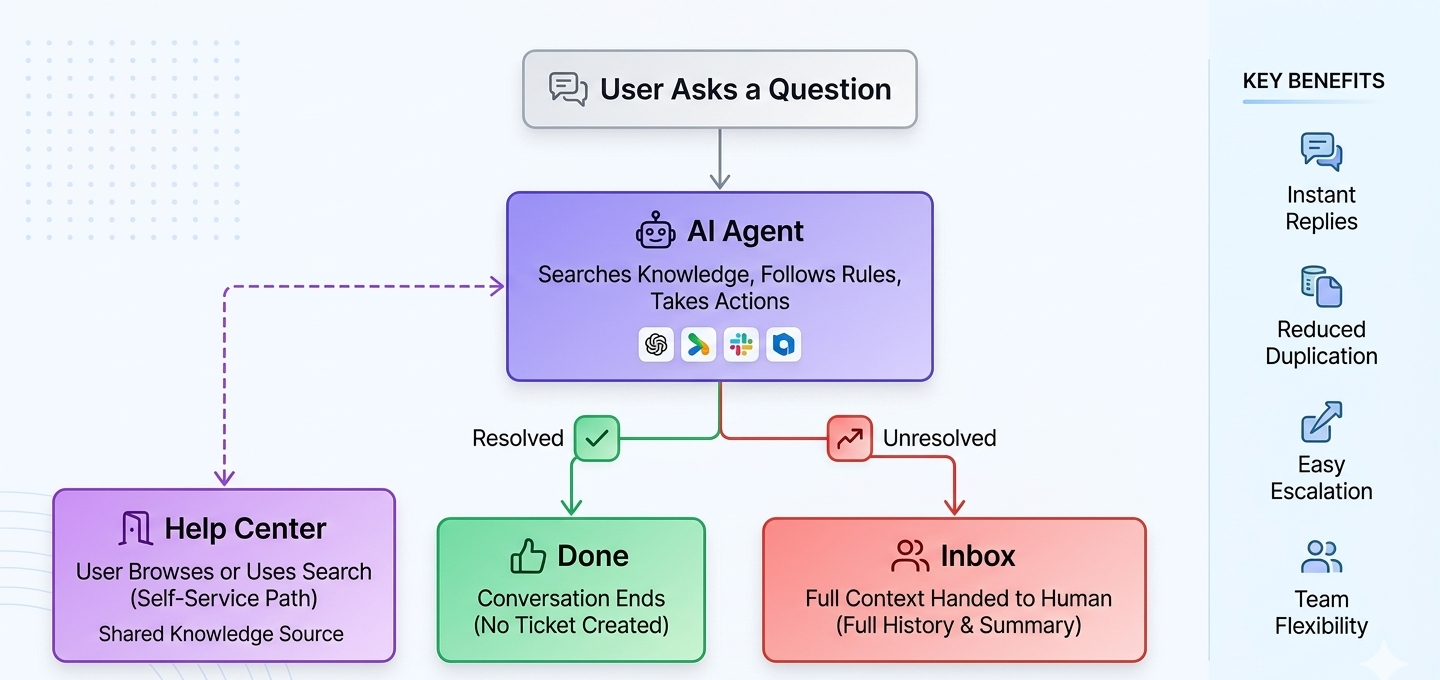
Every request in Enjo follows the same path regardless of which channel it arrives from. The AI Agent attempts to resolve it first. If it cannot, it hands the request to a human agent with the full conversation attached. Users can also find answers on their own through the Help Center without starting a conversation at all.
All three paths draw from the same connected knowledge sources. When you update your knowledge, the change is reflected everywhere.
Path | What happens |
|---|---|
AI Agent resolution | The agent searches your knowledge, follows your configured rules, and takes actions in connected systems to resolve the request. |
Human agent in Inbox | The agent receives the full conversation history, a structured summary, and any linked ticket context. They pick up where the AI left off. |
Help Center self-service | The user browses articles or uses AI-powered search to find an answer on their own. No conversation or ticket is created. |
The request flow
1. A user asks for help
The request arrives through a connected channel: Slack, Microsoft Teams, or web chat (Enjo widget).
The user does not need to file a ticket, choose a category, or know which team to contact. They describe what they need, and the AI Agent takes it from there.
Note: Email is also a supported channel, but inbound email routes directly to Inbox for human agent handling rather than going through AI resolution.
2. The AI Agent resolves the request
The AI Agent searches your indexed knowledge, follows the rules and workflows you have configured, and when you have configured System Actions takes actions in connected systems in real time to resolve the request. It works within the boundaries you define: what it can answer, what actions it can take, and when it must escalate.
If the agent resolves the request successfully, the conversation ends here. No ticket is created unless your rules require one.
3. If unresolved, the request escalates
If the AI Agent cannot resolve the request, whether because it falls outside your configured knowledge, requires human judgment, or triggers an escalation rule, it hands off to a human agent.
The handoff includes the full conversation history and a structured AI-generated summary. The human agent picks up in Inbox or in your connected ticketing system, depending on how you have configured escalation. The user is not asked to repeat any information.
Help Center: a parallel path
The Help Center runs alongside the request flow described above. Users can visit it at any time to browse articles or search for answers without starting a conversation.
Help Center articles can be used to train your AI Agent, keeping self-service content aligned with what the agent resolves. A user who finds their answer in the Help Center never generates a conversation or a ticket.
Where to go next
Set up your AI Agent to walk through the full setup path from knowledge to deployment.
Enjo Concepts for a closer look at any feature mentioned on this page.