
Performance Overview
Performance overview gives you a quantitative view of how your AI Agents are performing across every conversation. Use it to understand how often the AI is helping, resolving, or escalating, and how users are responding to those interactions.
The metrics on this page update based on the date range and AI Agent filter you select. You can view data for all agents combined or drill into a specific agent.
Filters
Two filters control all metrics on the Performance Overview page.
Date range: Choose from Last Week, Last One Month, Last Two Months, Last Three Months, or a Custom Range.
AI Agent: Defaults to All AI Agents. Select a specific agent from the dropdown to scope metrics to that agent only.
AI Performance
These three metrics measure how the AI Agent handled conversations during the selected period.
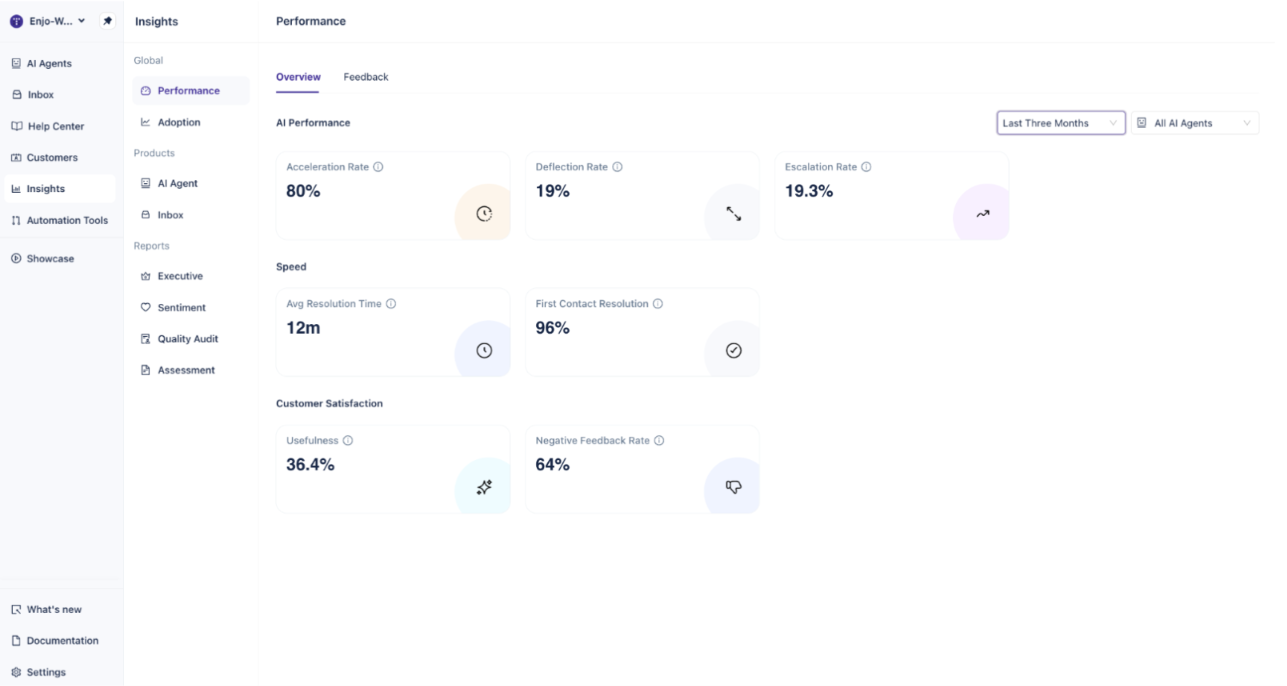
Acceleration Rate
The percentage of conversations where the AI Agent provided at least one helpful answer.
This includes conversations that were eventually escalated, as long as the AI contributed something useful before handoff. A high Acceleration Rate indicates the AI is finding relevant responses in its connected knowledge sources across most conversations.
Deflection Rate
The percentage of conversations the AI Agent resolved automatically, without human intervention.
A deflected conversation is one where the user received a complete answer from the AI and no escalation occurred. This is the primary indicator of autonomous resolution. Improving your knowledge sources, escalation rules, and AI Flows will typically move this number up over time.
Escalation Rate
The percentage of conversations escalated to a human agent.
Escalation Rate and Deflection Rate are related but not mirror images. A conversation can be accelerated by the AI and still escalate. Review conversations with high escalation frequency to identify knowledge gaps or unclear escalation rules.
Tip: Use the AI Agent filter to compare escalation rates across agents. Significant differences between agents often point to knowledge source gaps or misconfigured escalation thresholds.
Speed
Speed metrics measure how efficiently human agents are handling conversations after escalation.
Avg Resolution Time
The average time from when a conversation is assigned to a human agent to when it is closed.
This metric reflects human agent efficiency on escalated conversations. It does not measure AI-handled conversations that were deflected without escalation.
First Contact Resolution
The percentage of conversations closed without a reassignment or reopen.
A high First Contact Resolution rate indicates that escalated conversations are being handled completely the first time, without being bounced between agents or reopened after closing.
Note: Avg Resolution Time and First Contact Resolution only reflect escalated conversations where a human agent was assigned. Conversations fully resolved by the AI Agent are not included in these calculations.
Customer Satisfaction
These metrics capture how users responded to AI Agent interactions.
Usefulness
The average of all feedback received across conversations in the selected period.
Usefulness reflects how helpful users found the AI Agent's responses. This score aggregates all feedback signals, thumbs up, thumbs down, or explicit ratings, depending on how your AI Agent's feedback settings are configured.
Negative Feedback Rate
The percentage of feedback marked as not helpful.
A rising Negative Feedback Rate is a signal to review the specific conversations driving it. Common causes include outdated knowledge sources, responses that don't match the user's intent, or gaps in coverage for certain request types.
Tip: Cross-reference Negative Feedback Rate with Deflection Rate. High deflection alongside high negative feedback may indicate the AI is resolving conversations in ways users find unhelpful, a sign that quality, not just volume, needs attention.
What's Next
Adoption — Track how end users are engaging with your AI Agents across channels and identify opportunities to increase usage.
Setup Overview — Review the configuration steps required to get your AI Agent up and running in your workspace.
Engagement — See detailed engagement metrics showing how users interact with AI Agent responses over time.